⚠️ Experimental proof of concept
This proof of concept is experimental. It was carried out in a lab environment with Parallels RAS 22. It is neither officially validated, nor certified, nor supported by Parallels.
You know us: in our lab we enjoy pushing Parallels RAS where the docs don’t go. This time the question was easy to ask and far more fun to answer: can a Linux machine be recognized as a Remote PC by Parallels RAS 22? Not a Windows RDS server, not a Windows VDI — a real Linux Mint, with its XFCE desktop.
Short answer: yes, with the native RAS client — the session opens, the Active Directory user authenticates, and the XFCE desktop shows up. Tasty detail: in the RAS console the machine even reports OS Type: Windows 10 while it runs Linux. Over HTML5 it’s more nuanced, and we tell you exactly where it breaks.
Everything below was done in our lab farm, from network frames captured in our own environment. Nothing is supported by Parallels, nothing is “official” — it’s experimental interoperability, documented honestly.
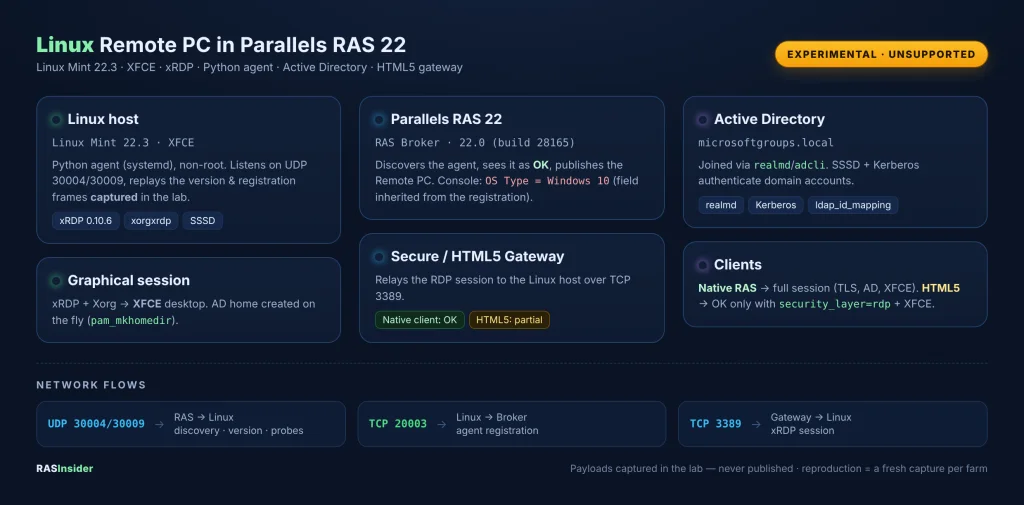
The architecture at a glance
Versions and prerequisites
The exact scope tested:
- Parallels RAS 22.0 (build 28165), Protocol Version 0;
- Linux Mint 22.3, xRDP 0.10.6.1, XFCE desktop, on VMware;
- Active Directory
microsoftgroups.local, joined viarealmd/adcli, resolved by SSSD; - ports: UDP 30004/30009 and TCP 20003 (agent/broker), TCP 3389 (xRDP session);
- Linux packages:
xrdp,xorgxrdp,xfce4,sssd,sssd-ad,realmd,adcli,krb5-user,libpam-sss,libnss-sss.
The role of the Python agent
The core of the POC is a small Python agent, non-root, started by systemd. It touches no RAS, xRDP or AD service — it only listens and answers the way a Parallels PC Agent would.
Concretely, it listens on UDP 30004 and 30009, answers the broker’s discovery with a version frame, then — when the broker asks — opens a TCP 20003 connection to send the registration. Those two frames are not invented: they are bytes captured in our lab, replayed as-is.
What the agent does (and doesn’t)
- it auto-remembers the first Remote PC ID RAS presents and injects it into the registration;
- it replaces the captured
MachineIdwith a fresh random UUID — precisely to avoid any identity collision; - it leaves every other opaque field untouched: nothing is fabricated;
- the registration is only sent with the explicit
--allow-captured-registrationflag; - it restarts no local service and runs under a non-privileged account.
Active Directory integration: SSSD, Kerberos, PAM
The Linux VM is joined to microsoftgroups.local via realmd/adcli. SSSD takes over with id_provider = ad, ldap_id_mapping = True and use_fully_qualified_names = False: AD accounts resolve whether you type user or [email protected].
On the session side, we add pam_mkhomedir.so to the xRDP PAM stack: on first login the AD user automatically gets a home under /home/. For the POC scope, Linux authorization stays broad (access_provider = permit); functional filtering is left to Parallels RAS, as it should be. In production, you tighten this.
xRDP and the XFCE session
The part that made us sweat was neither AD, nor PAM, nor Xorg: it was the desktop choice. By default startwm.sh launched Cinnamon, which exited immediately on the remote path. The validated fix: force XFCE only inside the test user’s xRDP sessions, via XRDP_SESSION in their ~/.profile. The local Cinnamon session is untouched.
⚠️ Experimental proof of concept
To finally get the HTML5 path to display anything, we had to switch xRDP to security_layer=rdp. This is an experimental workaround, not a production setting: it disables modern TLS negotiation on the xRDP side. The native RAS client, on the other hand, works perfectly with negotiate/TLS. Use only with full awareness.
Registration in RAS 22 — and the famous “Windows 10”
On the RAS Console side the procedure is standard: create a Remote PC object, fill in the Linux machine and port 3389, wait for PC Agent discovery, check the OK status, then publish the resource to an AD group.
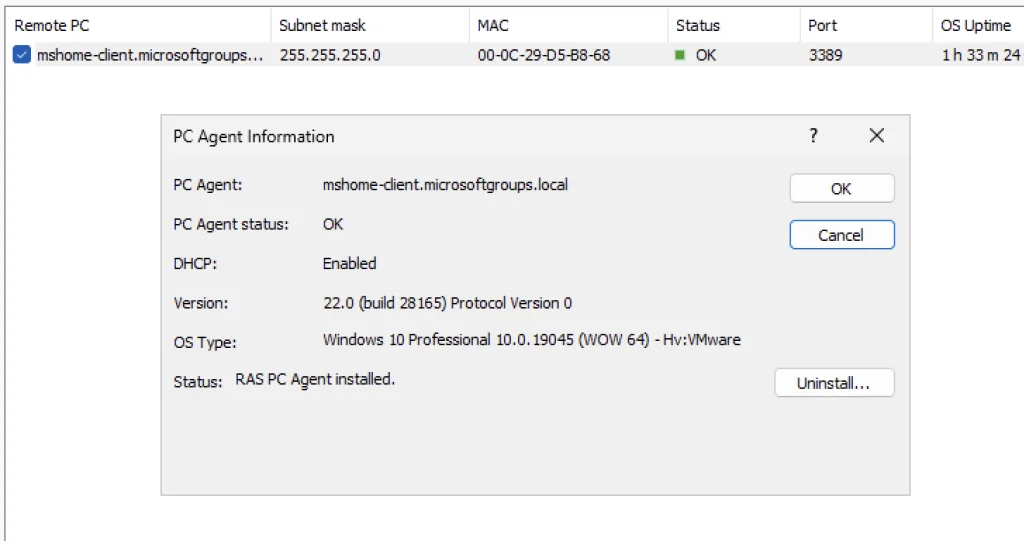
And here is the most telling wink of the POC: the console shows PC Agent OK, Version 22.0 (build 28165)… and OS Type: Windows 10 Professional. Why? Because that field is inherited from the captured registration and replayed by the agent. It describes the capture, not the real machine, which is very much a Linux Mint 22.3. It’s the best visual reminder that we’re in a lab replay, not in front of a native Linux agent.
The tests and their results
We tested native and HTML5 clients with several combinations. Here is the honest result, no sugar-coating:
| Client | xRDP security | Desktop | Result |
|---|---|---|---|
| Native RAS | negotiate / TLS | XFCE | ✅ Full session (AD + desktop) |
| HTML5 | security_layer=rdp | XFCE | ✅ Working (confirmed) |
| HTML5 | negotiate / TLS | XFCE | ⚠️ Stalls after TLS (no sesman) |
In other words: the native client opens a full session with no contortions. HTML5 only displays in a precise, experimental combination (security_layer=rdp + XFCE). With standard TLS security, the HTML5 session establishes TLS but never reaches xrdp-sesman.
The demo: the RAS portal and the published Linux resource
In the RAS portal (HTML5), the “Linux Xfce” resource appears next to the Windows ones. We launch it, and the Linux desktop shows up in the browser — Thunar file manager included, to prove it really is a Linux filesystem.

Limits and HTML5 compatibility: what to tell apart
Let’s be clear about HTML5, because two different problems overlap and must not be conflated.
1) A deployment defect on the gateway side. The HTML5 Gateway logs show ENOENT errors on portal web resources (www/desktop/deps.js, missing assets). That’s a real frontend defect of the gateway, independent of Linux — it deserves a clean repair/reinstall of the HTML5 Gateway component at the same RAS version.
2) The post-TLS RDP negotiation to Linux xRDP. Even with a healthy gateway, the HTML5 → Linux xRDP path stalls after the TLS handshake in “negotiate” security: xRDP never receives the expected PDU and creates no session. The native client, meanwhile, goes through. That’s why the HTML5 POC is only validated with security_layer=rdp + XFCE, and presented as experimental.
Parallels documentation does not guarantee the “Remote PC Linux/xRDP” path over the HTML5 portal, and the forum describes it as an unofficially supported use. Our observations match that reality: native works, HTML5 partial.
Reproduce it: the code is on GitHub (without the payloads)
We publish the agent, the systemd unit, the setup guide and a capture guide on GitHub. We do not, however, publish our captured frames: they are specific to our farm and our machines. The repo even blocks any commit of *.hex, *.pcap or *.bin.
To run the agent yourself, you must capture your own frames, on a machine and a farm you administer, during an authorized Remote PC enrolment: capture the UDP discovery and the TCP registration, check magic/opcode/length, extract the two .hex files. The full method is in the repo.
➜ GitHub repository: RASInsider/ras-linux-remote-pc-agent
Keep in mind
- the registration is specific to our farm: another farm requires a fresh authorized capture;
- the captured frames are not an officially documented protocol; they remain opaque and must not be presented as one;
security_layer=rdpis an experimental workaround, not to be recommended as-is in production;- the Remote PC Linux/xRDP path over HTML5 is experimental;
- no sensitive data — password, cookie, private key, business PCAP — is published.
Conclusion: honest about what it proves
This POC demonstrates three distinct things: a Python agent can be discovered and registered by RAS 22 from authorized captured frames; a Linux Mint joined to AD can authenticate domain users and open an xRDP/XFCE session; and the HTML5 portal can display that Linux session in a precise, experimental combination.
The remaining lock is the compatibility of the HTML5/RAS TLS negotiation with xRDP — distinct from authentication and from the Linux desktop. An experimental result, to be presented as such. We share all of this openly, Parallels included, without claiming any official support of the Remote PC Linux path over HTML5.
And honestly? Seeing a Linux Mint pass for a “Windows 10” in the RAS console, then serve an XFCE desktop to an AD user… that’s exactly the kind of lab hack we love sharing with you.
Go further
- Parallels RAS 22: what really changes, lab-tested
- Raspberry Pi 4 as a Parallels RAS 22 client: our Box64 proof of concept
- Inside HALB: no, you can’t just waltz in