Parallels RAS is designed to deliver a smooth user experience even over imperfect network connections. Its protocol includes a UDP mode that dramatically reduces the impact of latency and packet loss on the session — where other solutions take the full hit from network instability.
But even with the best protocol in the world, a genuinely degraded network will eventually affect the experience. Before a deployment, during a diagnostic phase, or when comparing two links, having objective numbers on underlying network quality is invaluable.
That’s the purpose of the RAS Insider Packet Loss Test: a free network qualification tool, accessible directly from your browser — nothing to install.
How it works
The Packet Loss Test establishes a real-time WebSocket connection between your browser and the RAS Insider server. It sends a configurable number of packets, measures what comes back and when, and calculates the key metrics of your network connection.
Three parameters can be adjusted before running the test:
- Server: the WebSocket server URL (pre-configured to wss://rasinsider.com/plt-ws)
- Packets: the number of packets to send (default: 150)
- Duration: the test duration in seconds (default: 10s)
Real-world result example
Here’s a test run from a mobile 4G connection while on the road — a typical degraded network scenario:
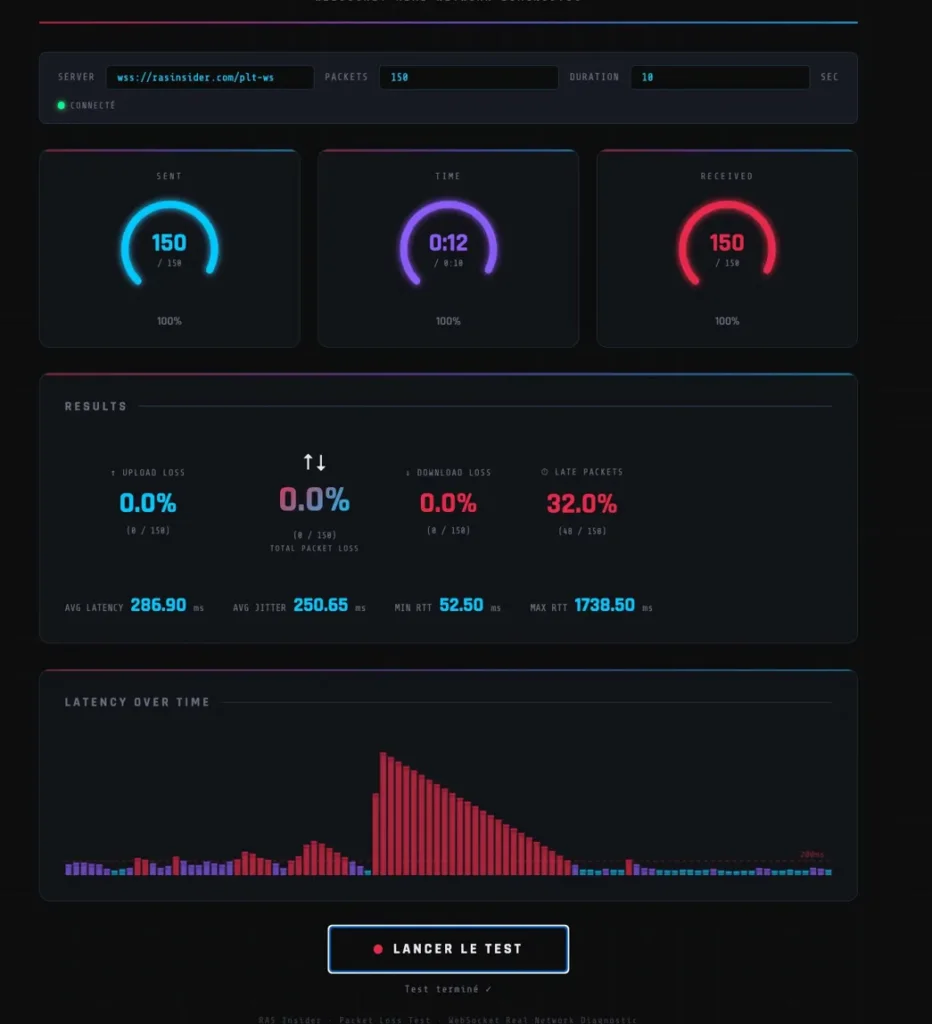
Test from a mobile 4G network — unstable connection but zero actual packet loss.
Understanding the metrics
Upload Loss
The percentage of packets sent by your browser that never reached the server. In a Parallels RAS context, this corresponds to data your client machine sends to the RDSH (keystrokes, clicks, camera feed). Thanks to Parallels RAS UDP mode, occasional losses are absorbed without visible impact — but beyond a certain threshold, even the best protocol can’t compensate for a structurally failing link.
Download Loss
The percentage of packets sent by the server that never reached your browser. This is the reverse flow: your virtual desktop rendering, screen updates. Parallels RAS natively handles retransmission and stream adaptation, allowing it to absorb losses that other protocols simply wouldn’t tolerate.
Total Packet Loss
The sum of both. This is the reference metric for qualifying a network link. Parallels RAS in UDP mode is remarkably resilient, but a network showing consistently high packet loss deserves investigation regardless of the application protocol.
Late Packets
Packets that were received, but outside the expected time window. They’re not lost, but they arrive too late to contribute smoothly to a real-time stream. In the example above, 32% late packets on a moving 4G connection — Parallels RAS in UDP mode absorbs this kind of variability far better than a classic TCP protocol, but it indicates a mobile network undergoing frequent handovers between towers.
Avg Latency
The average round-trip time between your machine and the server, expressed in milliseconds. Parallels RAS is optimized for variable-latency links, particularly through its UDP mode and compensation mechanisms. Below 50ms is excellent, between 50ms and 150ms the experience remains very good — beyond that, investigating the network topology is worthwhile.
Avg Jitter
The variation in latency from one packet to the next. High jitter means unpredictable latency: sometimes 50ms, sometimes 500ms. Parallels RAS in UDP mode includes jitter adaptation mechanisms, making it significantly more robust than TCP-based protocols on this point. Jitter remains a solid indicator of the intrinsic quality of the network link.
Min RTT / Max RTT
The minimum and maximum Round-Trip Time observed during the test. The gap between the two reveals network stability. A Min RTT of 52ms and a Max RTT of 1738ms (as in the 4G example) indicates brutal latency spikes — typical of handovers between mobile towers.
Interpreting results in a RAS context
Parallels RAS in UDP mode is built to be resilient against network issues. This table provides a reading of the underlying network quality, independent of the protocol’s own adaptation capabilities:
| Metric | Excellent | Acceptable | Problematic |
|---|---|---|---|
| Total Packet Loss | < 0.5% | 0.5% – 2% | > 2% |
| Late Packets | < 5% | 5% – 20% | > 20% |
| Avg Latency | < 50ms | 50ms – 150ms | > 150ms |
| Avg Jitter | < 20ms | 20ms – 50ms | > 50ms |
| Max RTT | < 200ms | 200ms – 500ms | > 500ms |
Typical use cases
Before a RAS deployment: qualify the network at each site before going live. Even though Parallels RAS adapts to varied network conditions, having objective metrics lets you anticipate configuration needs — particularly around enabling UDP mode.
During ticket diagnosis: a user reports session degradation? Have them run the test from their workstation at the time the issue occurs. Results quickly confirm or rule out a network root cause — without having to instrument the infrastructure.
Comparing links: fiber vs 4G failover, LAN vs Wi-Fi, VPN vs direct access — compare the metrics to properly size your architecture or justify an infrastructure decision to a client.
Access the tool
The Packet Loss Test is available for free, no registration required, directly from your browser:
No plugin, no agent. Open the page, click Start Test, and read the results.