If you manage a Parallels Remote Application Server (RAS) infrastructure, you know that the administration console is comprehensive. However, it can sometimes feel heavy for a quick check. Between connection peaks and unforeseen grace periods, a lack of licenses can take you by surprise.
That is why I developed the Licensing Monitor Parallels RAS. This lightweight utility offers visual, real-time monitoring of your resources. In short, it is an agile tool for your daily management.
Why use Licensing Monitor Parallels RAS?
One of the major reasons that pushed me to code Licensing Monitor Parallels RAS is the management of the Grace Period.
For many, licensing is a fuzzy concept, but with Parallels RAS, the rules are strict: if you exceed your license quota, you have a maneuvering margin of only 7 days. This is a welcome safety feature that avoids cutting off access to your collaborators immediately, but beware: if the situation is not rectified (by purchasing additional licenses) by the end of these 7 days, the RAS farm risks temporary deactivation.
Concretely, if the user surplus persists after the deadline, no one will be able to access published resources anymore. The system checks counters every 20 minutes and can take 1 to 2 hours to cut off or reactivate access.
How does my tool change the game? In the standard console, it is difficult to tell at a glance if you are within those 7 critical days. My License Monitor removes this ambiguity:
- It instantly displays if the grace period is “On.”
- It gives you the exact count of remaining days.
- It allows you to verify if licenses are properly released (which normally happens a few seconds after a session disconnects).
For technical details on this mechanism, I refer you to the official knowledge base: Details on the Parallels RAS Grace Period.
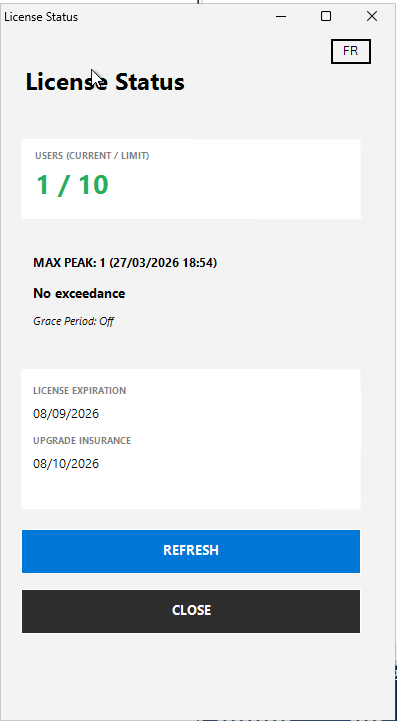
No more navigating through menus or performing manual calculations: launch the executable, authenticate, and know if you are “Safe” or on borrowed time in less than 3 seconds.
Feature Guide
I designed the interface to be as intuitive as possible. Here is what the different elements correspond to (following the numbered legend):
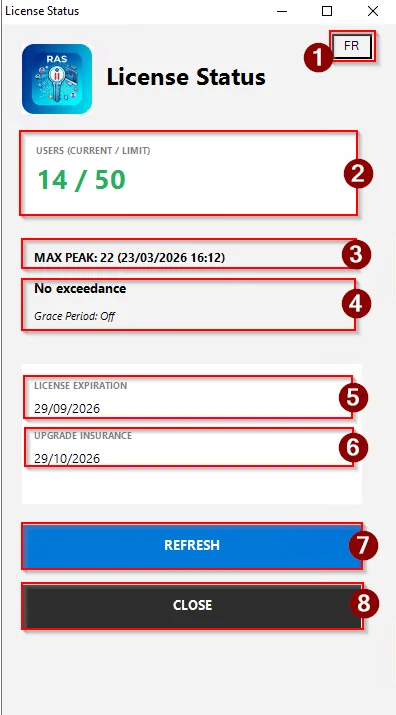
1. Language Switch (FR/EN) Because we often work in bilingual contexts, the tool allows you to instantly toggle the display between French and English. It is seamless and does not require restarting the application.
2. User Consumption (Real-time) This is the heart of the monitor. It shows the number of active sessions compared to the total quota. The color coding lets you know immediately if you are in the comfort zone or approaching the limit.
3. Connection Peak (Peak) Very important for sizing! This line indicates the record for simultaneous connections reached since the last reset, including the precise date and time. Ideal for justifying the purchase of new licenses during quarterly reports.
4. Grace Period Status If you exceed your quota, Parallels RAS does not block users immediately; it activates a grace period. The tool tells you if it is active (“On”) and, more importantly, how many days are left before an actual lockout.
5. License Expiration Simple and effective: the date on which your current subscription ends.
6. Maintenance Renewal (Insurance) This point is often overlooked. This date indicates how long you are entitled to major updates. If you are planning an upgrade of your RAS farm, make sure this date has not passed!
7. Refresh Button One click and the tool queries the server again. Useful for tracking connection trends during peak hours.
8. Close Button Exits the application and properly closes the communication session with the RAS server.
Technical Side: Security First
Although this is a “home-made” tool, security remains a priority. Authentication does not require any special account: you simply use your usual Parallels RAS credentials, following the format defined on your infrastructure.
Furthermore, data protection is technically guaranteed. The entered password is treated as a SecureString. Consequently, no sensitive information circulates in plain text within the system memory. The tool is thus perfectly safe for use in production environments.
Summary
It is a simple tool, but one that saves the day when you want to ensure everything is running smoothly on the licensing side without wasting time. If you have questions about setup or the PowerShell modules used (RASAdmin), feel free to leave a comment!
Licensing and the grace period are just the tip of the iceberg. If you encounter more specific issues or wish to deepen your knowledge of the architecture, we have provided a dedicated tool.
You can find all the Parallels RAS KBs necessary for understanding the solution in our RASInsider Search — A Full-Text Search Engine for Parallels RAS Documentation. This is a valuable time-saver for accessing official indexed answers directly for administrators.
📥 Offline Download
This small utility allows you to monitor the real-time license status of your Parallels RAS farm (Active sessions, Connection peaks, Grace period, and Expiration).
⬇ License monitor for Parallels RAS – v1.0
SHA-256 : 6EDBD92DB79372499E7D7CDAA629D77B1E00F184FE84B84FF705931F5714D6C3